Having NAT types explained clearly is the first step toward understanding why your devices sometimes struggle to communicate online. A dropped video call, a game that refuses to connect to a lobby, or a VoIP app that works fine at home but acts up at the office can all trace back to network address translation - a foundational concept that shapes how your devices reach the Internet. Understanding what NAT does, why different NAT types exist, and what practical constraints each one creates can save you hours of troubleshooting and help you make smarter decisions about your network setup.
Key Takeaways:
- Network address translation (NAT) lets multiple devices share a single public IP address, but it introduces connection restrictions that vary by NAT type.
- Open, moderate, and strict NAT types (or Type 1, 2, and 3 in console terminology) directly affect peer-to-peer connections, gaming, and real-time communication.
- Double NAT - running two routers in sequence - is a common cause of unexplained connectivity failures in home and small business setups.
- Actionable fixes exist for each NAT type, from enabling UPnP to configuring DMZ or requesting a static IP from your ISP.
Content Table
What Is Network Address Translation?
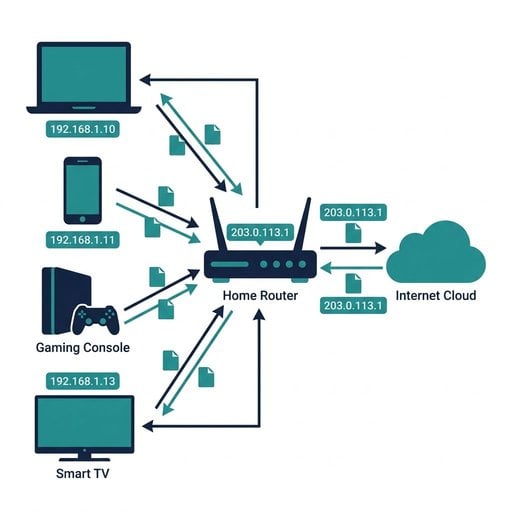
Every device that connects to the Internet needs an IP address. The problem is that the global pool of IPv4 addresses is exhausted. RFC 1918 solved part of this problem by defining private IP address ranges (such as 192.168.x.x and 10.x.x.x) that can be reused inside any local network. A NAT router sits at the boundary between your private network and the Internet, translating private addresses into the single public IP your ISP assigns to you.
When your laptop sends a request to a web server, your NAT router rewrites the source address from your private IP (say, 192.168.1.50) to your public IP before forwarding the packet. When the reply comes back, the router reverses the translation and delivers the data to the right device. From the Internet's perspective, every device on your network looks like one machine.
This is elegant and practical, but it creates a side effect: unsolicited inbound connections have no obvious destination. The router does not know which internal device should receive a packet that nobody requested. That ambiguity is exactly what the different NAT types address in different ways.

NAT Types Broken Down
The terminology differs slightly depending on whether you are reading about gaming consoles or networking theory, but the underlying behavior maps cleanly. Here is how the main NAT types work in practice.
Full Cone NAT (Open NAT / Type 1)
Once a device opens an outbound connection, the router creates a mapping that accepts any inbound packet sent to that public IP and port, regardless of who sends it. This is the most permissive type. Peer-to-peer connections, multiplayer games, and real-time apps all work without friction. It is common when your device is directly connected to a modem with no router in between, or when a device is placed in the router's DMZ.
Address-Restricted Cone NAT (Moderate NAT / Type 2)
The router allows inbound packets only from an external IP address that the internal device has already contacted. The external port does not matter. This is the most common NAT type in home routers and strikes a reasonable balance between security and connectivity. Most online games and video calls work fine here, though some peer-to-peer scenarios require extra negotiation.
Port-Restricted Cone NAT
Inbound packets are only accepted if they come from the exact IP address and port number that the internal device previously contacted. This is more restrictive than address-restricted NAT. Real-time communication tools may struggle unless they use STUN or TURN relay servers to punch through.
Symmetric NAT (Strict NAT / Type 3)
Each outbound connection gets a unique external port mapping, and inbound packets are only accepted from the exact destination the internal device originally contacted. Two devices both behind symmetric NAT cannot establish a direct peer-to-peer connection. Strict NAT is common on corporate firewalls and some ISP-grade equipment. It is the most secure but the most disruptive for real-time applications.
| NAT Type | Console Term | Inbound Rule | P2P / Gaming |
|---|---|---|---|
| Full Cone | Open / Type 1 | Any source allowed | Excellent |
| Address-Restricted Cone | Moderate / Type 2 | Known IP only | Good |
| Port-Restricted Cone | Moderate / Type 2 | Known IP + port | Fair |
| Symmetric | Strict / Type 3 | Exact destination only | Poor |
Port Address Translation and How It Fits In
Port address translation (PAT) is often used interchangeably with NAT, but there is a useful distinction. While basic NAT maps one private IP to one public IP, port address translation maps many private IPs to a single public IP by tracking unique port numbers for each session. When your router juggles simultaneous traffic from a laptop, a phone, and a smart TV, it is PAT doing the heavy lifting.
PAT is why your router can differentiate between a Netflix stream on your TV and a browser session on your laptop even though both appear to come from the same public IP. Each outbound connection gets a unique source port in the translation table. When replies arrive, the router matches the destination port to the correct internal device.
This is also why applications that rely on specific port numbers can break behind a NAT router. If two devices both try to use source port 5000, the router must remap one of them, and if the receiving application expects a fixed port, the connection fails. This is a common issue with SIP-based VoIP and some older peer-to-peer protocols.
The Double NAT Problem
Double NAT happens when two routers perform address translation in series. A typical scenario: your ISP provides a modem-router combo device that already performs NAT. You then connect your own router to it for better Wi-Fi coverage or more control. Now every device on your network passes through two layers of NAT before reaching the Internet.
The symptoms are subtle but frustrating. Port forwarding rules you set on your inner router have no effect because the outer router does not know to forward traffic to it. UPnP may work inconsistently. VPN clients may fail to establish tunnels. Gaming consoles will almost always report strict or moderate NAT even after you configure the inner router correctly.
You can confirm double NAT by comparing the WAN IP address shown in your router's admin panel with your actual public IP. If they differ and the WAN IP falls in a private range (10.x.x.x, 172.16-31.x.x, or 192.168.x.x), you are behind double NAT. Use our IP lookup tool to find your real public IP and compare it against your router's reported WAN address.
The cleanest fix is to put the ISP device into bridge mode, turning off its NAT function so only your router handles translation. If your ISP does not allow bridge mode, you can place your inner router in the outer router's DMZ, which effectively gives it a direct path to the Internet.
A Concrete Example: Gaming Console Behind a Router
Imagine you connect a PlayStation 5 to a home router. The router's WAN IP is 203.0.113.45 (a real public IP from your ISP). Your console gets the private address 192.168.1.10.
When you launch a multiplayer game, the console connects to the game's matchmaking server at 198.51.100.22 on port 3478. Your router creates a PAT entry: internal 192.168.1.10:49152 maps to external 203.0.113.45:49152. The matchmaking server responds and the session works. So far, so good.
Now the game tries to establish a direct peer-to-peer voice chat connection with another player. That player's console sends a packet directly to 203.0.113.45:49153. If your router runs address-restricted cone NAT, it checks whether 192.168.1.10 ever contacted the other player's IP. If the matchmaking server introduced them, it has, and the connection succeeds. If your router runs symmetric NAT, it assigned a different external port for each outbound flow, so the inbound packet arrives on a port the router has no record of, and it drops the packet. Voice chat fails silently.
The fix in this case is to either enable UPnP (so the console can request a consistent port mapping), set a static private IP for the console, and add a port forwarding rule, or place the console in the DMZ. Each approach has trade-offs covered in the next section.
Actionable Steps to Improve Your NAT Type
The right fix depends on your specific setup and how much security you are willing to trade for connectivity. Here are the most practical options, ordered from least to most invasive.
1. Enable UPnP on Your Router
Universal Plug and Play lets applications automatically request port mappings from your router. Most consumer routers support it. Log into your router's admin panel (typically at 192.168.1.1 or 192.168.0.1), find the UPnP setting under Advanced or WAN settings, and enable it. Reboot the device requesting better NAT and recheck. UPnP is convenient but carries security risks on networks with untrusted devices, so use it only on trusted home networks.
2. Set Up Static Port Forwarding
Assign a static private IP to the device you want to improve (via DHCP reservation in your router), then create a port forwarding rule that maps the required external port to that device's internal IP. This is more secure than UPnP because you control exactly which ports are open. Check the documentation for your specific application to find which ports it needs.
3. Resolve Double NAT
As described above, put your ISP's device into bridge mode or place your router in the ISP device's DMZ. If you are a SaaS buyer evaluating network-dependent tools, double NAT is one of the first things to rule out when a product behaves inconsistently across different office locations. You can also check whether your IP address has ended up on any block lists as a result of misconfigured routing by using our IP blacklist checker.
4. Request a Static Public IP
If your ISP assigns you a dynamic IP that changes periodically, consistent port forwarding can break. A static public IP costs a small monthly fee with most ISPs but makes port forwarding reliable and simplifies remote access configurations. For businesses running SaaS tools that require inbound webhooks or API callbacks, this is often worth the cost.
5. Consider IPv6
IPv6 eliminates the need for NAT entirely because every device gets a globally unique address. IPv6 (RFC 8200) is increasingly supported by ISPs and operating systems. If your ISP offers IPv6, enabling it on your router can resolve many NAT-related issues for applications that support dual-stack networking. Check your current IP version and connectivity using our IP address tool.
6. Use a VPN with NAT Traversal
Some VPN protocols, including WireGuard, handle NAT traversal well and can give devices behind strict NAT a more open connection path. This is particularly useful for remote workers connecting back to a corporate network from a home setup with restrictive NAT. Keep in mind that adding a VPN adds latency, which matters for real-time applications. The WireGuard documentation covers NAT traversal behavior in detail.
Quick Diagnostic Tip: If you suspect your IP address is causing connectivity issues beyond NAT, check whether it appears on any DNS-based block lists. Misconfigured routers and shared ISP addresses sometimes end up flagged. See our guide on how to remove your IP from a blacklist for a step-by-step walkthrough.
Conclusion
NAT types are not just an abstract networking concept. They have direct, measurable effects on whether your applications connect reliably, how peer-to-peer services perform, and whether your port forwarding rules actually work. Understanding the difference between full cone, address-restricted, and symmetric NAT gives you a concrete framework for diagnosing connection problems instead of guessing. The double NAT scenario alone accounts for a surprising number of support tickets in SaaS products that depend on inbound connections. Start with the diagnostic steps above, identify which NAT type and topology you are working with, and apply the targeted fix rather than cycling through random router settings.

Instantly Check Your Public IP and Connection Details
See your real public IP address, detect double NAT, and understand exactly how your network presents itself to the Internet - all in one free tool.
Try Our Free Tool →
Basic NAT maps one private IP to one public IP. Port address translation (PAT) maps many private IPs to a single public IP by assigning unique port numbers to each session. Most home routers use PAT, which is why multiple devices can share one public IP address simultaneously without conflicts.
Compare the WAN IP shown in your router's admin panel with your actual public IP (check using an IP lookup tool). If your router's WAN IP falls within a private address range (10.x.x.x, 172.16-31.x.x, or 192.168.x.x) rather than matching your public IP, you are behind double NAT.
UPnP can move you from strict to moderate or open NAT by allowing applications to automatically request port mappings. However, it only works if there is a single NAT layer. If you have double NAT, UPnP on the inner router will not help because the outer router still blocks unsolicited inbound traffic.
Symmetric NAT assigns a unique external port for every distinct outbound connection. When a remote peer tries to connect back using the port it observed, the router has no matching entry and drops the packet. Two devices behind symmetric NAT cannot predict each other's port assignments, making direct peer-to-peer connections impossible without a relay server.
For IPv6 traffic, yes. IPv6 provides a globally unique address to every device, removing the need for address translation. However, most networks still carry IPv4 traffic alongside IPv6, so NAT issues persist for IPv4 connections until the Internet fully transitions, which is still years away for most environments.